Blog
Skills: Teach Every Agent How Your Organization Works
A skill is a Markdown document that tells an agent how a job is done in your organization. Gatana now stores your skills in one place, installs them into the folders Claude Code, Codex, Cursor and others read, and keeps them current at the start of every session.
Oct 1, 2026 · Gatana Team
The knowledge is in someone’s dotfiles
Agents are good at doing work. They are bad at knowing how work is done here: which branch a release is cut from, what a pull request review has to cover, where to look first when an error shows up. People have started writing that down for them as skills. A skill is a SKILL.md with a name, a one-line description of when it applies, and the instructions. Claude Code, Codex, Cursor, Gemini CLI and most other coding agents read skills from a folder on the machine.
The folder is the problem. A skill one person writes lives in their home directory. A colleague copies it, improves it, and now there are two. A new hire gets neither. When the release process changes, nobody knows which machines still carry the old instructions.
Skills in Gatana put those documents in one place, under the same access rules as the rest of your gateway, and install them onto every machine that needs them.
One document, written once
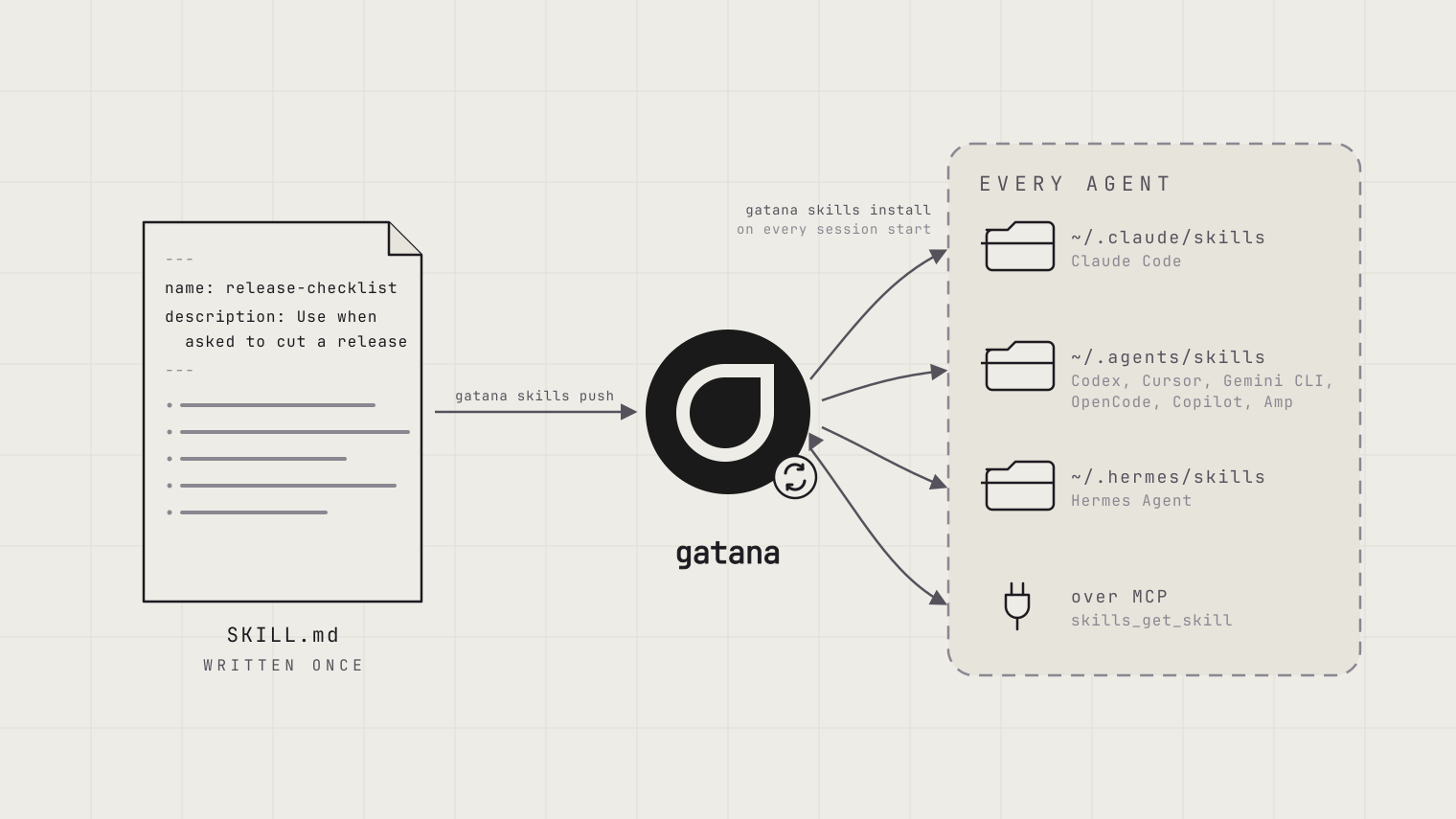
A skill is one Markdown document. The frontmatter carries the name and the description. The body is the instructions.
---
name: release-checklist
description: Use when asked to release a backend service or cut a new version
---

1. Start from a clean checkout of `main` with a green test run.
2. Bump the version in `package.json` and tag the commit `backend/vX.Y.Z`.
3. Push the tag. The pipeline builds the image and deploys to staging.
4. Watch the staging dashboard for ten minutes before you promote.
This is the same open SKILL.md format the agents read today, so a skill you already have can be pasted in as it is. Create skills in the dashboard under Skills, with a Write tab and a Preview tab. Or push them from your machine with the CLI. Or let an agent save one over MCP (more on that below).
Write the description for an agent that decides whether the skill applies. Say when to use it, not what it contains. The description is the line agents see in the list; the body is only read once a skill is chosen.
Installed where your agents look
npm install -g gatana
gatana config login your-organization
gatana skills install
Install writes every skill you can read into ~/.claude/skills for Claude Code and ~/.agents/skills for Codex, Cursor, Gemini CLI, OpenCode, Copilot and Amp. Hermes has its own folder: pass hermes as a target. Any other path works too. Each skill becomes a SKILL.md in a folder of its own name, which is the layout the agents expect. From the agent’s point of view nothing changed. The skills are simply there.
The CLI keeps track of the folders it writes. It leaves skills you keep in those folders yourself alone, and it does not overwrite a local edit you have not pushed yet. When a skill is deleted in Gatana, the next install removes it from the machine (keep it with --no-prune).
Kept current by the agent itself
Install also offers to add a hook. The hook runs on the SessionStart event of Claude Code and Codex (Hermes and OpenClaw have their equivalents), executes gatana skills install --quiet, and is finished before the first prompt. Every session starts with the current skills. Nobody runs an update command. The hook prints nothing, because Claude Code and Codex add hook output to the model’s context.
You can inspect the hook with gatana skills hook claude, skip it with --no-hooks, and take it out again with gatana skills remove-hooks.
Changes flow back
Edit an installed SKILL.md, or write a new folder, and push:
gatana skills push                                       # everything that changed on this machine
gatana skills push ~/.claude/skills/release-checklist    # one skill
gatana skills push ./team-skills -c release-engineering  # a folder of skills, into a collection
The next session on every other machine gets the change. If someone else changed the same skill in the meantime, push reports a conflict and leaves the server copy alone. Install first to see their version, or push with --force.
Collections
A collection is a named group of skills: release-engineering, support-runbooks, data-platform. Install one with gatana skills install release-engineering and the machine follows that collection. New skills added to it arrive on the next session, and skills outside it stay away. A collection is also shared as one unit. Deleting a collection does not delete the skills; they move to the root level.
Who reads what
Access rules match the rest of Gatana. A skill is Organization-wide by default: every member can read it, and so can every member’s agents. Set it to Private and share it with people or teams. Each share is Can read or Can maintain, and maintainers can edit, share and delete. A skill in a collection also reaches whoever the collection is shared with, and collection maintainers maintain every skill in it.
This matters for the install: gatana skills install installs the skills you can read. The platform team’s incident runbook lands on the platform team’s machines and nowhere else. The instructions of a skill are stored encrypted at rest with your organization’s key; the name and description stay searchable. Every create, edit, share and delete is recorded in the audit log.
Skills over MCP
Not every agent has a home directory. A hosted agent, a chat assistant, a workflow in your own code: they reach the same skills through the built-in Skills MCP server in the gateway. It has four tools, skills_list_skills, skills_get_skill, skills_create_skill and skills_update_skill. The list returns names and descriptions grouped by collection. Get returns the SKILL.md.
The write tools close a loop. An agent that has worked out how to do something, say the five steps to rotate a particular credential, can save it as a skill. The next agent, on any machine or none, finds it. To make agents look before they act, add one line to the project’s CLAUDE.md or its equivalent: “At the start of a task, call skills_list_skills and follow any skill that applies.”
The fine print
- Skill names are kebab-case and unique in the organization. A collection is a label, not a namespace: a name cannot repeat across collections, and the folders on disk stay flat, which is what the agents expect.
- Install asks before it adds a hook. A quiet or non-interactive install never writes one.
- Frontmatter fields Gatana does not know (
license,allowed-tools, …) are kept across push and install. Gatana adds its own entries undermetadataso a file on disk traces back to its skill, organization and revision. - Skills are exposed as MCP tools, not as MCP prompts.
Getting started
Open Skills in the dashboard and create your first skill, or push the folder you already have with gatana skills push. Then run gatana skills install on each machine and accept the hook. The Skills documentation covers the CLI, the hook, collections and permissions in detail.