Blog
Persistent Storage in the Gateway
In-gateway deployments of Executable Apps and Runnable FaaS can now keep a managed volume mounted at /data. Files survive restarts, redeploys, and idle stops, fully encrypted.
· Erik Jonsson Thorén, Founder, Gatana
Deployed servers used to forget everything
Servers that Gatana deploys for you (Executable Apps and Runnable Code) start from a fresh filesystem on every deploy. For a stateless tool server that is exactly what you want: every deploy is reproducible, and nothing accumulates.
But plenty of useful MCP servers are built around state. A memory server writes a SQLite file. A knowledge-base server builds an index that is expensive to recompute. An agent collects notes over weeks. Until now, whatever a server wrote to disk was gone after a restart, a redeploy, or the automatic stop of an idle server. The workaround was an external database, even when a single file on disk would have done the job.
One checkbox, one volume
Persistent storage gives a server one managed volume, mounted at /data. Check Attach Persistent Storage when you create the server, or enable it later under Storage in the server’s Settings tab. The server restarts once to mount the volume. From then on, files under /data survive restarts, redeploys, and idle stops.
The mount path is also exposed in the environment variable GATANA_DATA_DIR, so your code can read the variable instead of hardcoding the path. Many community MCP servers already accept a data directory as configuration: point it at /data and they keep their state without any code changes.
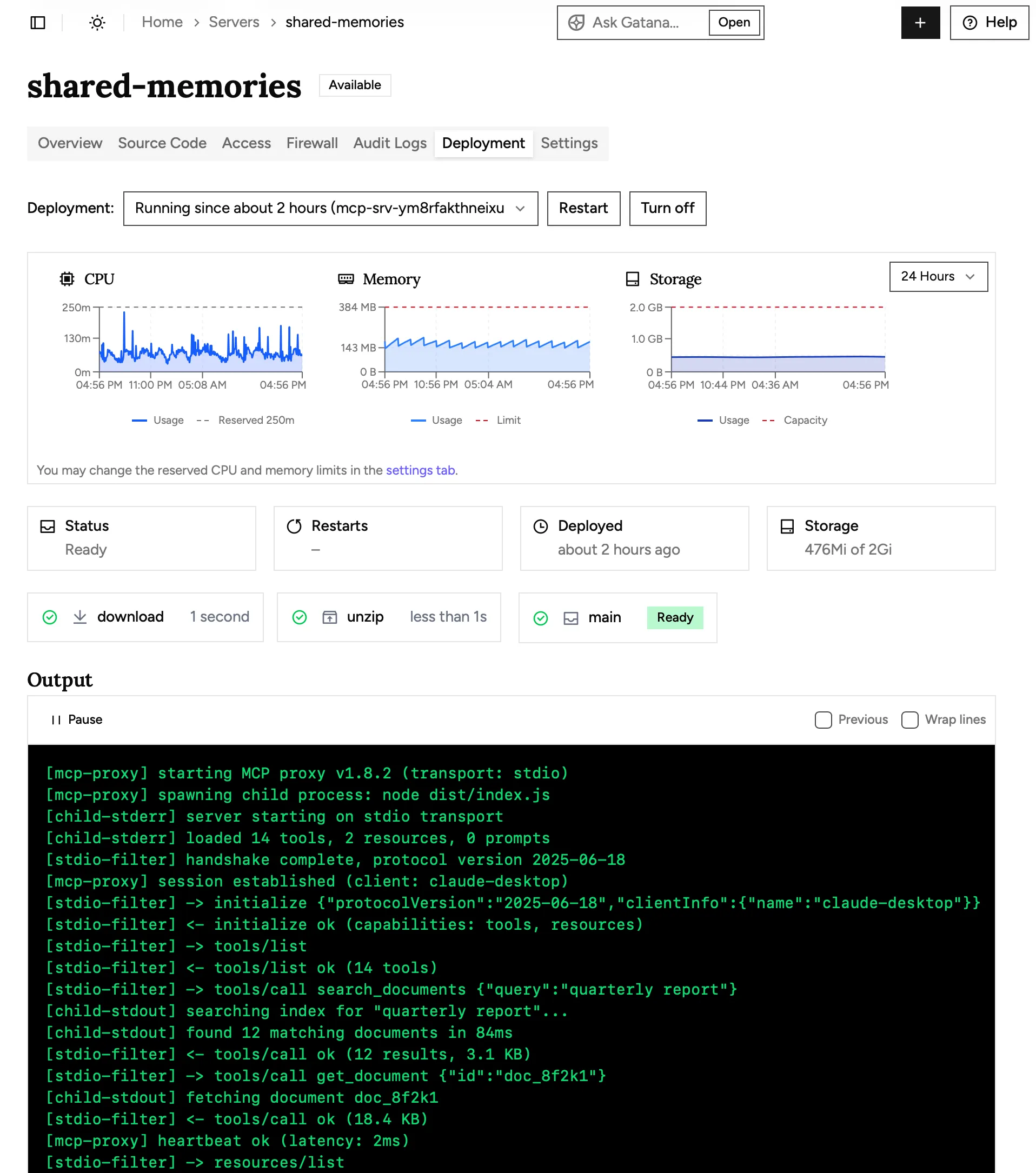
You can watch the volume fill up, too. The server’s Deployment tab shows storage as a third chart next to CPU and memory: the size of the volume and how much of it is used, over time.
Turning it off is not deleting it
A volume moves through four states, and only the last one destroys data:
| The volume is | Your data is | Until |
|---|---|---|
| Attached | On the volume, mounted at /data |
You turn storage off, or delete the server |
| Detached | Kept on the volume | You turn storage on again, or delete the server |
| Orphaned | Kept with the deleted server’s volume | 50 days pass, or an owner deletes the volume |
| Deleted | Gone | Never (this state is the end) |
Detaching is reversible: turn storage back on and the same volume is mounted, with the files as they were. Deleting a server does not destroy its data either; the volume becomes orphaned and is kept for 50 days, in case the deletion was a mistake. What you should know: volumes are not backed up. Once a volume is deleted, the data cannot be recovered.
Organization owners manage all of this from the new Storage page in the sidebar. It lists every volume in the organization (including orphaned ones), shows the total claimed against the quota, and charts each volume’s usage. The quota counts the size volumes claim, not the bytes written to them: 20 Gi per organization by default, and support can raise it.
Encrypted at rest, down to the disk
Volumes live on a Ceph cluster inside Gatana’s infrastructure, and everything on it is encrypted at rest. Each device that stores volume data is a LUKS (dm-crypt) encrypted device with its own unique key. Those keys are held in the cluster’s monitor store, and the disks that hold the monitor store are themselves encrypted, so the key chain closes at the encrypted system disk. Neither your data nor the keys that protect it ever touch an unencrypted disk.
None of this is configuration you have to opt into or pay extra for. It is simply how every volume is stored.
The fine print
- A volume can be attached to one running instance at a time. On a redeploy, a server with storage stops its old instance before the new one starts, instead of overlapping the two, so a redeploy pauses the server for a moment. Servers without storage keep the overlapping behavior.
- Every volume has the same fixed size, set by the platform. Enabling storage for a server is refused when it would push the organization past its quota.
- Remote HTTP and OpenAPI servers run outside Gatana, so this setting does not exist for them.
- Self-hosted installations offer persistent storage when they are configured with a Kubernetes storage class for the volumes.
Getting started
Create a server and check Attach Persistent Storage, or open Settings → Storage on a server you already have. The Persistent Storage documentation covers the full lifecycle, the quota, and the Storage page in detail.